MIDI Deck
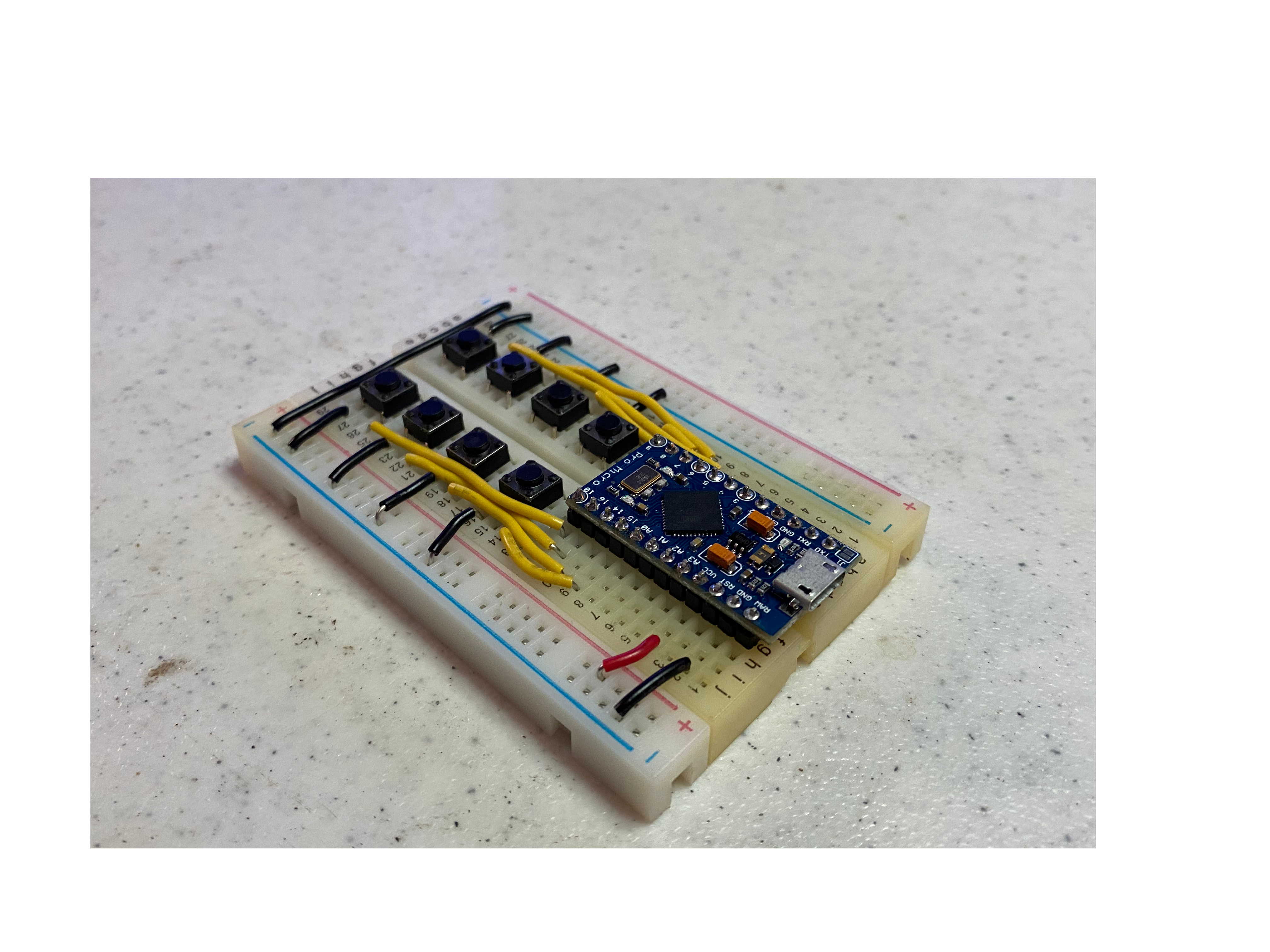
What is it? an Arduino Pro Micro MIDI controller, connected via USB, that can send MIDI messages to a host on button press. The idea is to automate apps on the host, in my primary use case, OBS. Press button, things happen.
The design is as dead simple as possible so it’s easy to build, total cost is under $20 (likely less).
Why?
There were 2 main drivers I had for building this, the first is when I’m recording for YouTube videos. I use OBS with several cameras and other inputs and rather than flipping between them in editing I switch while recording. Why? I hate editing and this saves time there.
Second is for streaming, the keyboad combos I ended up using in OBS were awkward to use and I was always forgetting them. There’s a reason the StreamDeck exists, this serves the same function.
Goals
For the initial version, I had the following objectives:
- All command comms use MIDI (rather than HID)
- Prefer an Arduino platform
- Be as simple as possible to build
- Low cost
- Use PlatformIO to build
MIDI
So why MIDI and not HID? Well, mainly because I have some other projects that I want to use MIDI on an Arduino for, this was the chance to have a super simple project to learn how to do it. My learning process tends to be additive and cumulative, I start with simple ideas, learn it thoroughly, then grow and learn more.
Arduino
Why Arduino and not a, say, ESP32 or even a Raspberry Pi? The Pi could certainly do this but as of this writing, late 2022, they’re still difficult to find and tend to be costly due to the chip chortage.
The specific Arduino I chose was the Pro Micro, it has sufficient pins and runs the ATmega32u4 processor with native USB support. It’s that processor that enables the MIDI goal to be met. Note that this board appears to many things, including how you compile for it, as the Leonardo. From what I can tell this is simply a smaller profile of that board but has the same basic features and functionality.
Simple to Build
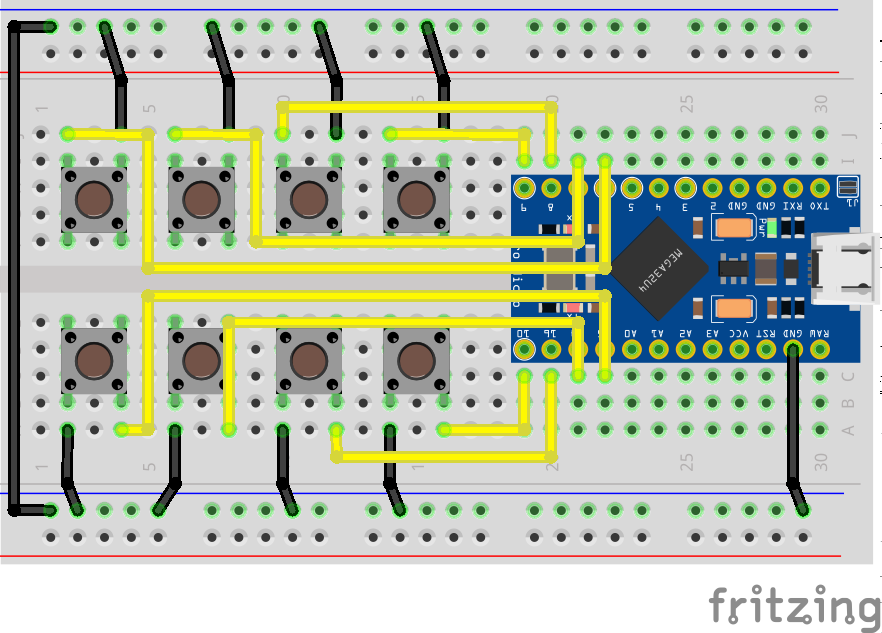
I wanted this to be simple enough that anyone could make it, that meant keeping the hardware part to the absolute bare minimum. In this case it’s just the chip and the buttons, nothing else. The internal pull-up resistors on the Arduino are used for the buttons and debouncing is done in the software. Future, or maybe alternate ones, in the future might have some of those bits, we’ll see.
Low Cost
I picked up the 3 Arduino boards off Amazon for less than 20 bucks, add in the buttons, the board and wire and you’ll MAYBE hit 20 total. Big maybe.
PlatformIO
I like using PlatformIO (pio) with Visual Studio Code (vscode), the goal was to keep doing that. I’m supplying pre-built firmware, but if you want to build from scratch:
- Install VSCode
- Install PlatformIO
- Git clone this repo
- Build & upload
The PlatformIO project includes the needed board (Arduino Leonardo) and the MIDIUSB library (version 1.0.5 at this time).
I believe the Arduino IDE could be used to build this code, I haven’t tried it, you’re on your own for that.
Hardware
Materials Needed
Acquire the following, there’s not much needed:
Wiring Diagram
Hook it all up as follows:
OBS Setup
Once you’re sure the hardware is working, and it sending the correct MIDI commands, download the obs-midi-mg plugin. Note that I’ve only tested this on a Mac, not Windows or Linux, on those platforms you’re on your own.
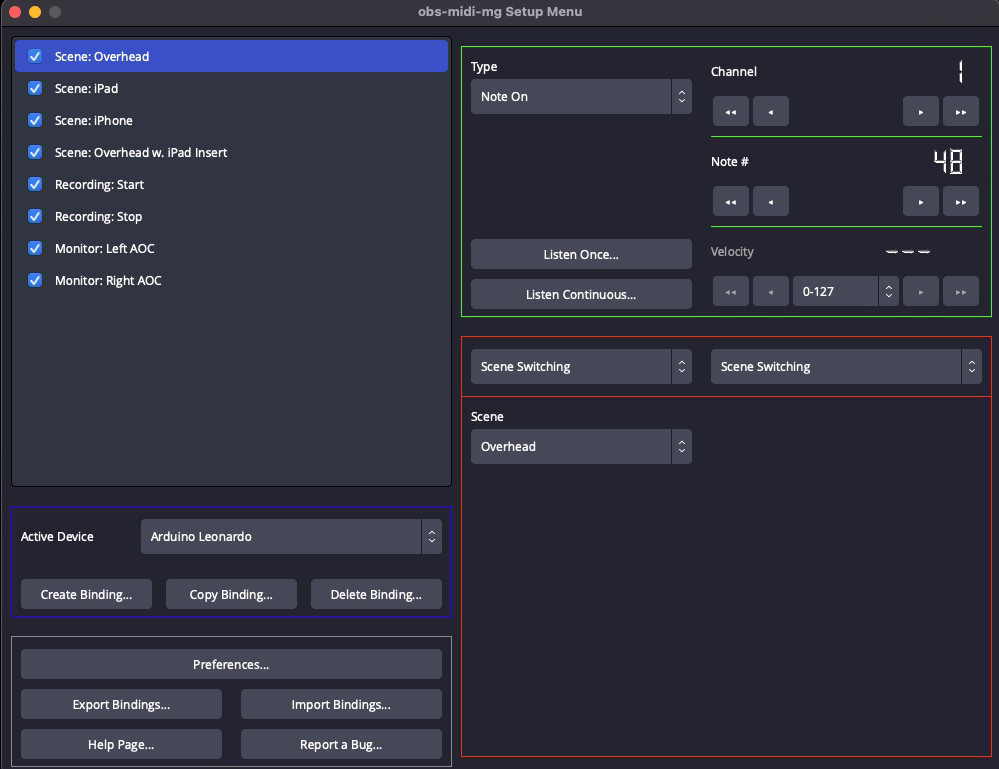
Once installed, launch OBS and bring up the plugin configuration menu. Add the 8 button, and using the “Listen Once” action press the button desired on the OBS Remote to bind the hardware button to the plugin. I changed the velocity to be any valid value, rather than what’s in the code, it doesn’t affect operation, all that’s needed is the correct noteOn value.
My setup:
Companion Video
This page goes with my YouTube video on how to build and use this here.